SpringCloud
Gateway AbstractGatewayFilterFactory<.class> globalFilter
성찬우
2022. 9. 2. 17:54
https://fitchan.tistory.com/56
Gateway AbstractGatewayFilterFactory<.class> customFilter
gateway에 필터를 추가해서 여러가지 정보를 오고가도록 설정을 할 수 있다. .yml 파일에서 해당 필터는 [1] gateway : default-filters 또는 [2] gateway : routes : filters 로 구분하여 등록이 가능하다. [1]번..
fitchan.tistory.com
이전 포스팅에서는 Custom Filter를 등록하고 인자값을 확인해 보았는데
이번에는 Global Filter를 활용하여 Custom filter와 어떤 차이점이 있는지 확인해보도록 하겠다.
cloud:
  gateway:
    default-filters:
      - name: GlobalFilter
        args:
          baseMessage: Spring Cloud GateWay Globar Filter with chan
    routes:
      - id: 1
        uri: http://localhost:8081/
        predicates:
          - Path=/first/**
        filters:
          - name: CustomFilterExample
            args:
              baseMessage: this is CustomFilterExample
글로벌 필터의 가장큰 특징은 default-filters : 부분을 확인해야한다.
routes단계에서 필터를 넣어주는 것이 아니기 때문에 가장 먼저 실행되고 가장 늦게 처리가 된다.
default-filters:
  - name: GlobalFilterExample
    args:
      baseMessage: Spring Cloud GateWay Globar Filter with chan
      pre: true
      post: true
이렇게 인자값과 name으로 필터class를 설정해준다.
@Component
@Slf4j
public class GlobalFilterExample extends AbstractGatewayFilterFactory<GlobalFilterExample.Config> {

    public GlobalFilterExample() {
        super(Config.class);
    }


    @Override
    public GatewayFilter apply(Config config) {
        return (e, c) -> {
            ServerHttpRequest request = e.getRequest();
            ServerHttpResponse response = e.getResponse();

            log.info("Global filter baseMessage : {}", config.getBaseMessage());
            if(config.isPre()){
                log.info("Global filter start : request id == {}",request.getId());
            }

            //Custom Post Filter
            return c.filter(e).then(Mono.fromRunnable(() -> {
                if(config.isPost()) {
                    log.info("Global filter End : response code == {}", response.getStatusCode());
                }
            }));
        };
    }

    @Data
    public static class Config {
        private boolean pre;
        private boolean post;
        private String baseMessage;
    }
}
이렇게 pre filter가 실행될 때와 post filter가 실행될 때 yml에서 ture 값을 주어서 참이 되기때문에 log.가 찍히게 되었다.
해당 path.로 요청을 보내게 되면
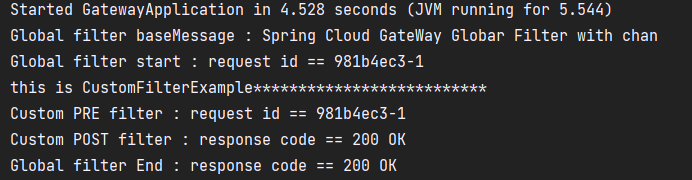
global filter가 실행되어 baseMessage를 띄우게 되고
중간에 customfilter가 들어와있고 마지막으로 Globalfilter End라는 문구가 출력되는것을 확인 할 수 있다.