고정 헤더 영역
상세 컨텐츠
본문
https://fitchan.tistory.com/54
yml파일로 설정을 하는데에서 어느 정도 한계가 있어보여
코드로 조금더 타입을 정할 수 있을 것 같아 공부해 보았다.
전과 동일한 조건에서 시작을 하는데
마이크로 서비스 firstService(port : 8081)와 secondService(port : 8082)가 존재한다.
그리고 Gateway로 등록된 서버는 8000번 이다.
코드로 설정해보기
우선 yml 로 설정한 값들을 모두 주석 처리 해주고.

Config하나를 만들어준다.
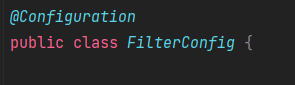
이후 당연히 @Bean을 등록을 해줄것인데
RouteLocator라는것이 존재한다.
@Bean
public RouteLocator gatewayRoutes(RouteLocatorBuilder builder) {

    return builder.routes()
            .route(r -> r.path("/first/**")
                          .uri("http://localhost:8081/")

            )
            .build();
}
Builder패턴으로 정리를하는데 . 심지어 람다 형식이다. 조금 어려워 보이지만 뜯어보면 별거 없다.
r이라는 매게변수가 "/first/**" 라는 경로로 들어오게 되면 (당연히 여기서는 gateway의 포트인 8000번이다)
"http://localhost:8081/"로 보내버려 라는 내용이다.
아까도 이야기했듯이 조금더 세세한 설정이 가능한데 .filters 를 통해 가능하다.
이번에는 Second 의 서버도 추가해서 코드를 작성했다.
@Bean
public RouteLocator gatewayRoutes(RouteLocatorBuilder builder) {
    return builder.routes()
    |        .route(r -> r.path("/first/**")
    |                       .filters(f -> f.addRequestHeader("first-request", "firstRequestValue")
    여기보세용                             	.addRequestParameter("first-parameter", "firstParameterValue")
    |                               		.addResponseHeader("first-response", "firstResponseValue"))
    |                        .uri("http://localhost:8081/")
            )
            .route(r -> r.path("/second/**")
                            .filters(f -> f.addRequestHeader("second-request", "secondRequestValue")
                                    .addResponseHeader("second-response", "secondResponseValue"))
                            .uri("http://localhost:8082/")
            )
            .build();
}
여기보세용 한 곳을 해석해보자면
(거듭 강조하지만 Gateway port: 8000)
r이라는 매게 변수가 path가 http://localhost:8000/first/** 로 들어오면
f라는 매게 변수에 RequestHeader, RequestParameter, ResponseHeader를 추가 할것이다.
("key", "value")의 형태로
이제 이러한 Header들이 제대로 들어오는지 다른 Client 서버에서도 Controller로 @RequestHeader로 받아 쳐야한다.
@ReqestHeader key값으로 value받기
방금전 설정해준 Request Header는 각각 "first-request" , "second-request" 였다.
Client 프로잭트에서
@RestController
@RequestMapping("/first")
public class GatewayServiceController {

    @GetMapping("/headerRecieve")
    public String headerRecieve(@RequestHeader("first-request") String header){
        log.info(header);
        return header+ " = First Client's Message";
    }
}
여기는 firstService이기 떄문에 SecondService 에서도 똑같이 설정을 해준다.
결과 보기
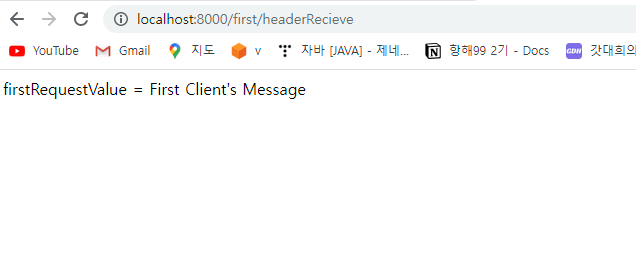
이렇게 8000포트로 보내면 Client 에서 설정된 String 값이 그대로 return 되는 것을 확인 할 수 있다.
그리고 ResponseHeader또한
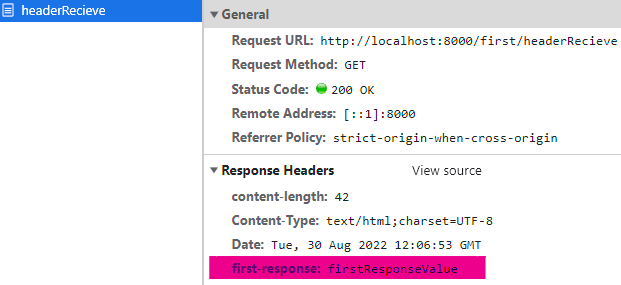
Netword에서 확인 할 수 있다.
key-value 값을 끼워넣어 라우팅해준 것이다.
'SpringCloud' 카테고리의 다른 글
| Gateway AbstractGatewayFilterFactory<.class> globalFilter (0) | 2022.09.02 |
|---|---|
| Gateway AbstractGatewayFilterFactory<.class> customFilter (0) | 2022.09.02 |
| API Gateway 기본 예제(.yml 로 설정) (0) | 2022.08.30 |
| API GateWay (0) | 2022.08.29 |
| [Eureka] 기본 예제 (0) | 2022.08.24 |


댓글 영역